

PICTS Mobile Product Features

Streamlined Process
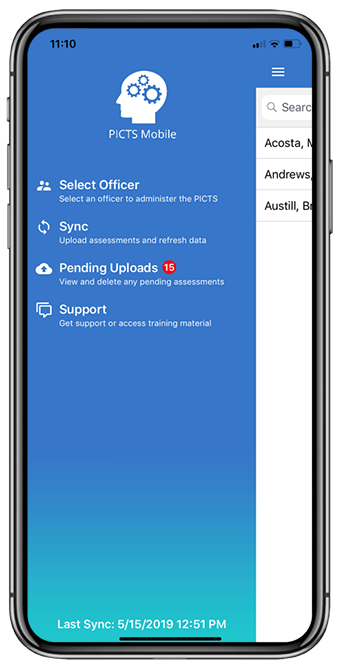
Client responses are collected and then synced with PCRA. This eliminates the need to manually enter the data which improves accuracy and confidentiality.
Secure with Guided Access
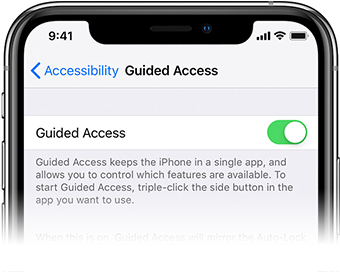
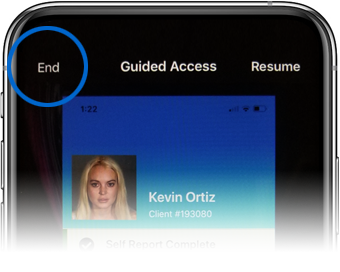
Guided Access limits your iOS device to only use PICTS Mobile while the client is taking an assessment.
 Go to Settings > General > Accessibility > Guided Access.
No More Paper!
PICTS Mobile is an alternative to the current paper version of the PICTS Self-Report Assessment.
Easy to Use
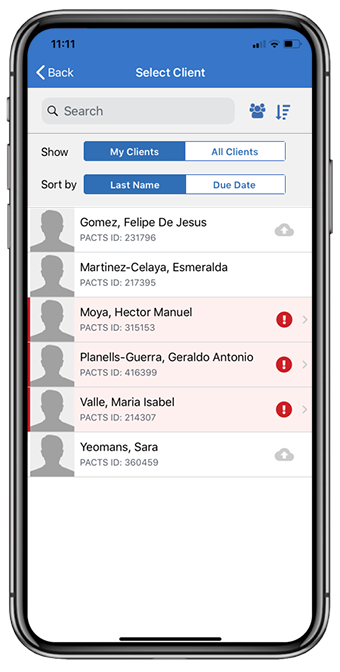
Client sorting capabilities and intuitive color scheme are the new User Experience (UX) enhancements.
From the field...
David Lardizabal
Probation and Pretrial Services
Western District of Texas
Get PICTS Mobile!
The new PICTS Mobile app can be downloaded from the ‘USC Apps’ Internal App Store, the same place iPACTS is downloaded. Your district IT Support Staff have been provided instructions to assist you.
Frequently Asked Questions
-
What is PICTS Mobile?
PICTS Mobile is an application designed to administer the Psychological Inventory of Criminal Thinking Styles (PICTS) electronically. It is an alternative to the current paper version of the PICTS and iSelf Report (iSR) assessments.
-
Who can use PICTS Mobile?
Officers and Officer Assistants who are certified in the Post-Conviction Risk Assessment (PCRA) 2.0 tool.
-
How is PICTS Mobile different from iSR?
PICTS Mobile is a replacement for iSR. iSR only works on iPad. PICTS Mobile can be used on multiple devices.
-
What will happen to iSR?
In the future, iSR will be retired. A communication to the field will be sent out with a retirement date.
-
Why you should use PICTS Mobile?
- PICTS Mobile allows Officers the freedom to administer the assessment on the go in offline mode.
- It reminds Officers of upcoming due assessments.
- It saves Officers time by directly uploading the assessment. No need to manually enter the responses into PACTS / Risk Assessment.
- It creates an auto-chrono in PACTS upon syncing PICTS Mobile.
- PICTS Mobile adheres to the confidentiality policy requirements, by protecting the answers of the client.
- It gives Officers the ability to view/sort client caseload.
- Gives Officers the ability to administer the assessment for any client in the district’s caseload.
-
Where can you use PICTS Mobile?
- PICTS Mobile is fully functional in offline mode.
- Officers can administer the PICTS for multiple clients.
- The application stores the data until the Officer is connected to the network and able to sync.
- PICTS Mobile can be set up in Guided Access mode to administer the PICTS for all district clients.
-
Would the device be secured if handed over to the client?
With Guided Access Mode "on", the device is limited to a single app and lets the Officer lock down the interface while the client is taking the assessment.
Q&A's for IT StaffAfter PICTS Mobile is released – How to Prepare
-
What device do you need to use PICTS Mobile?
PICTS Mobile is designed to operate on Apple iPhone, iPad iOS 10 and above and any Windows 10 device (coming soon) like the Surface Pro.
-
How to get PICTS Mobile?
There are two parts to setting up PICTS Mobile:
- The PICTS Mobile application can be downloaded from the USC Apps Catalog after enrolling in AirWatch on the iOS device.
- PICTS Mobile credentials are required to complete the PICTS Mobile installation. Credentials are district specific. Please contact your local IT administrator for setup.
-
What are PICTS Mobile credentials?
PICTS Mobile credentials (User Name and Password) are required to securely communicate with the ESB Web Services and are created by the Department of Technology Services (DTS). The credentials are proprietary to the PICTS Mobile Application and must be kept confidential by the district's IT staff. After the initial set-up, a user will not need to log in or input a password to open PICTS Mobile in the iOS device.
-
Where do IT Staff get my District Credentials for PICTS Mobile?
Please contact NSD for credentials at 210-536-5000. Option 5, then Option 1.
-
What about future updates to PICTS Mobile?
No further action will be needed from the IT staff for any future updates. Future updates will be pushed automatically to user devices once they have been set up.
-
How can IT staff help officers improve usability of PICTS Mobile when syncing?
The AO supports the optional usage of Virtual Private Network (VPN) on Demand technology. This allows devices to automatically turn on the VPN when syncing in PICTS Mobile. This prevents Officers from manually navigating to settings to turn on their VPN prior to syncing their PICTS Mobile application.
-
Does my district have to use the Guided Access feature?
Yes. Guided Access is a security feature that locks down the device except for access to PICTS Mobile. Guided Access will prevent the client from navigating outside of the PICTS Mobile application. Access to the self-assessment questions is only accessible when Guided Access is enabled. When setting up Guided Access, Officers will select and manage a 4-digit Passcode. In districts with shared devices ensure that the Passcode is shared with all users.
"The PICTS Mobile app is very easy to use and a quick way to complete the PICTS questionnaire. A great tool to use without having to carry around extra paper!"
Chris LarremoreUS Probation Officer
Northern District of Texas
Upcoming Features
Prevent Invalid Assessment
Clients will be restricted to submit assessments with 5 or more questions unanswered.
Improved Accessibility
Adding the ability to increase or decrease font sizes within the app for better user accessibility.
Network Detection
Users are notified when connected to the network and have assessments waiting to sync.
Have an Idea for PICTS Mobile?
We love hearing from our users! Your input is valued and we encourage you to send us a message.
Support
If you require training or technical assistance, please contact the National Support Desk, SDSO Training site, and/or release notes for any information or assistance you may need.
National Support Desk
123.123.1234
(Option 5, then Option 1)
or, via Self Service
Training Materials
http://www.uscourts.gov
Realease Notes
v1.1.4 | Date: 6-09-2021